
New: the WP Godmode Dashboard
The new WP Godmode Dashboard gives every connected site a clearer starting point.
Instead of opening WP Godmode and wondering what the assistant already knows, the dashboard now shows the current website status, detected tools and useful next steps in one place.
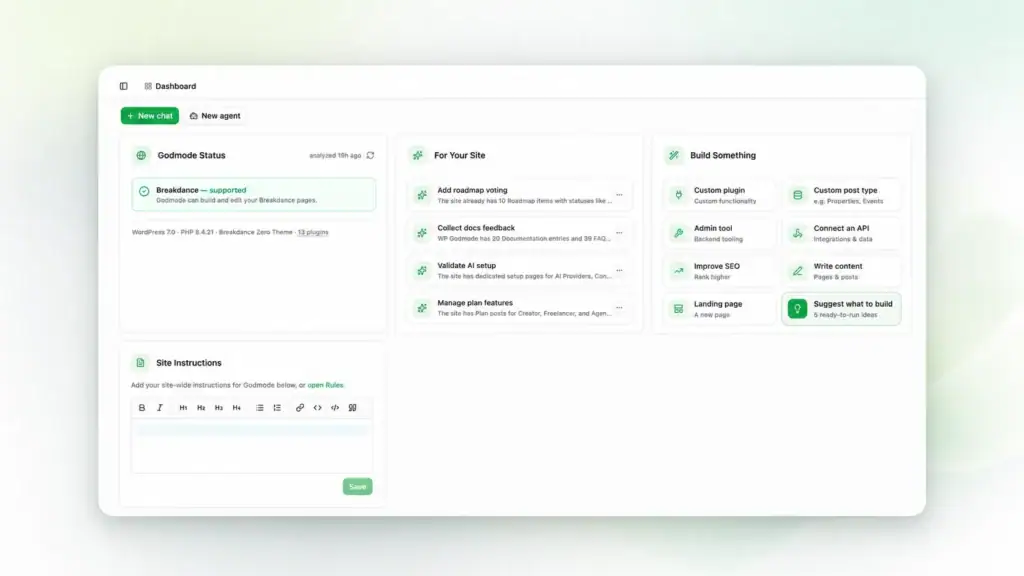
Smarter site detection
Godmode now detects the page builder used on the website. When a matching page-builder Skill is available, it can automatically install it so the assistant has the right site-specific knowledge before it starts building.
That means better results for Breakdance, Elementor, Avada and other builder-based sites because Godmode can work with the right structure instead of treating every site the same way.
More useful context
The dashboard also includes a field for site instructions, so teams can define project-specific rules, preferences and constraints once and keep them available for future work.
Better build ideas, made for the actual site
The build ideas are not generic prompts. Godmode can now surface suggestions that are tailored to the website in front of it: improvements to existing pages, fixes for visible issues, cleanup tasks, missing sections, stronger calls to action, content opportunities and next development steps.
For agencies and site owners, that turns the dashboard into a practical backlog. Open a site, see what Godmode has detected, pick a useful suggestion and start building from there.
A better place to start
The goal is simple: before you ask Godmode to build, fix or improve something, the dashboard gives you a faster read on the site and better prompts for what to do next.